AI for Shopify stores is no longer a future concept — it’s quickly becoming a practical advantage for merchants who want higher conversions, better personalization, and clearer attribution. In 2026, Shopify’s AI features and agentic storefront controls are reshaping how customers discover, evaluate, and buy products online.
A real conversation before we begin
A few months ago, a store owner asked me something that stuck.
“Everyone keeps saying AI will change ecommerce. But what exactly do I do on my store on Monday morning?”
That question matters. Because AI talk online is loud, abstract, and often useless for small and mid-size merchants who just want more sales, better data, and fewer guesses.
This article is not about hype.
It’s about practical AI — what works right now, what Shopify is actually rolling out, and how you can measure whether AI is helping or just burning money.
If you run a Shopify store (or plan to), this guide is written for you.
Why AI for Shopify Stores Matters More Than Ever in 2026
AI has been around for years. So why does it suddenly feel unavoidable in 2026?
Three reasons.
1. Shopify itself is pushing AI into the core platform
This isn’t a “third-party tools only” phase anymore. Shopify is building AI directly into:
- product content
- admin workflows
- storefront discovery
- analytics and decision support
When the platform owner pushes a direction, merchants who ignore it usually fall behind.
2. Customer behavior is changing — fast
Customers are no longer:
- browsing category by category
- clicking 10 product pages
- reading long descriptions carefully
Instead, they:
- skim
- ask AI assistants questions
- expect “best option for me” answers
This changes how products are discovered and how attribution works.
3. AI is no longer expensive or technical
What used to require:
- data teams
- custom ML models
- large budgets
Now works with:
- prompts
- plugins
- lightweight integrations
That’s why small and mid-size merchants can finally compete.
What “agentic storefronts” actually mean (in plain English)
Let’s clear up the buzzword first.
What does “agentic” mean?
An agentic system is one that:
- understands a goal
- takes actions toward that goal
- adjusts based on outcomes
In ecommerce terms, this means:
Your store doesn’t just display products —
it actively helps customers decide, personalize, and convert.
Traditional storefront vs agentic storefront
Traditional Shopify store:
- Static product pages
- Same content for everyone
- Merchant manually tests changes
- Attribution based mostly on clicks
Agentic storefront:
- Content adapts based on visitor intent
- AI assists product discovery
- Recommendations evolve in real time
- Attribution includes AI-assisted decisions
Think of it less like a “website” and more like a smart salesperson who learns.
Shopify’s AI features that matter (not the marketing ones)
Let’s separate signal from noise. Shopify has officially introduced AI tools like Shopify Magic and Sidekick to help merchants automate content and gain faster insights.
Shopify Magic (content & media)
This focuses on:
- product descriptions
- email copy
- ad text
- image generation
Useful? Yes — if guided properly.
Without guidance, it produces generic content.
With prompts, it becomes a multiplier.
Shopify Sidekick (decision support)
Sidekick is more interesting than it looks.
It:
- answers questions about your store data
- surfaces insights without dashboards
- helps merchants make faster decisions
This is Shopify quietly training merchants to think in AI-assisted workflows.
https://www.shopify.com/sidekick
AI channel discovery (the big shift)
Here’s the part most people miss.
AI assistants (search, chat, recommendation engines) are:
- summarizing stores
- ranking products conversationally
- influencing buying decisions without clicks
This means:
- attribution is no longer only “last click”
- visibility depends on structured data, clarity, and trust
Your storefront now needs to explain itself to machines, not just humans.
How AI breaks traditional attribution (and why merchants panic)
Let’s talk about attribution honestly.
The old model
- Ad → Click → Product → Purchase
- Easy to track
- Easy to optimize
The new reality
A customer might:
- ask an AI assistant for “best skincare for sensitive skin”
- see your product summarized
- visit later directly
- buy days after
Where did the conversion come from?
AI doesn’t always pass referral data cleanly.
This scares merchants — but it’s manageable.
The solution is better attribution models, not ignoring AI.
10 affordable AI tools Shopify merchants can use today
No enterprise nonsense here. These are tools that:
- small teams can afford
- don’t require engineers
- integrate cleanly with Shopify workflows
1. AI product description enhancers
Use AI to:
- rewrite for clarity
- adapt tone for different audiences
- create variants for ads, SEO, and email
Key rule:
Never auto-publish without human review.
2. AI image enhancement tools
Use AI to:
- improve lighting
- generate lifestyle mockups
- resize for channels
This reduces expensive photoshoots for early-stage products.
3. AI personalization engines
These tools:
- adapt homepage sections
- reorder collections
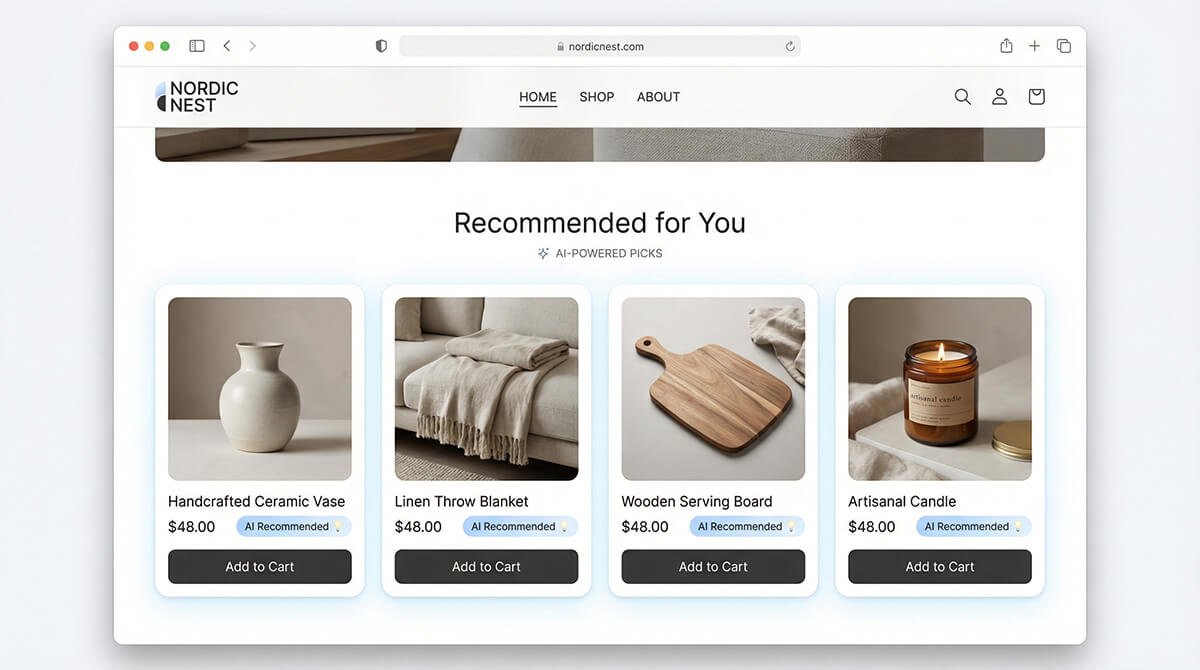
- personalize recommendations
Even simple “people like you bought” logic improves AOV.
4. AI search inside your store
AI-powered search:
- understands intent
- handles typos
- suggests better matches
This alone can improve conversion without changing design.
5. AI chat (not dumb chatbots)
Modern AI chat:
- answers product questions
- references your content
- escalates to humans
Done right, it replaces long FAQs and reduces support tickets.
6. Prompt management tools
Instead of random prompts:
- save tested prompts
- reuse across content
- standardize tone
This keeps brand voice consistent.
7. AI pricing & inventory signals
Some tools:
- suggest pricing ranges
- flag slow-moving SKUs
- predict restock timing
These don’t replace judgment — they inform it.
8. AI email segmentation
AI can:
- cluster customers by behavior
- predict churn
- personalize subject lines
Result: fewer emails, better results.
9. AI ad creative testing
Generate:
- multiple headlines
- image variants
- copy angles
Then let data decide — not opinions.
10. Analytics assistants
Ask questions like:
- “Why did conversions drop last week?”
- “Which products perform best on mobile?”
This saves hours inside dashboards.
Step-by-step: Using AI on product pages (real workflow)
Let’s make this practical.
Step 1: Audit one product page
Choose:
- a mid-performing product (not best, not worst)
Baseline metrics:
- CTR
- time on page
- add-to-cart rate
- conversion rate
Step 2: Rewrite product copy with AI (guided)
Prompt AI to:
- explain benefits simply
- answer objections
- write for a specific audience
Then edit manually.
Step 3: Improve visuals
Use AI to:
- clean backgrounds
- generate lifestyle context
- test alternate hero images
Step 4: Add AI-powered recommendations
Place:
- related items
- bundles
- complementary products
Step 5: Improve on-page clarity
Use AI to:
- rewrite FAQs
- simplify shipping info
- improve trust signals
Step 6: Measure after 2–4 weeks
Compare:
- before vs after metrics
- segment by device
- check bounce rate changes
This is how AI earns its place — with data.
Attribution & analytics: tracking AI-driven results
This is where most guides fail. Let’s fix that.
Use consistent UTM standards
Even for AI tools:
- tag links
- label campaigns clearly
- separate AI-assisted vs manual
Track assisted conversions
Look beyond last click:
- time lag reports
- returning visitor conversions
- direct traffic spikes after AI exposure
Use Shopify’s built-in reports smarter
Focus on:
- conversion by referrer
- behavior over time
- product-level trends
Accept imperfect attribution
Not everything will be perfectly trackable.
That’s okay.
Your goal is directional confidence, not perfection.
ROI concerns (and how to control costs)
Let’s address the fear.
Common worries:
- “AI tools are expensive”
- “We’ll lose brand voice”
- “What if it doesn’t convert?”
Practical rules:
- Start with one use case
- Cap monthly spend
- Kill tools that don’t show value in 60 days
In-house vs third-party
Use in-house AI (Shopify, built-in tools) for:
- content
- insights
Use third-party tools for:
- personalization
- advanced analytics
Ethics, privacy, and trust (brief but important)
AI should:
- respect customer data
- avoid dark patterns
- be transparent when relevant
Avoid:
- fake reviews
- misleading AI claims
- hidden manipulation
Trust compounds.
Short-term tricks destroy long-term brands.
TL;DR checklist (save this)
AI for Shopify — essentials
- ☐ Start with content + search
- ☐ Improve one product page at a time
- ☐ Track before/after metrics
- ☐ Use AI to assist, not replace judgment
- ☐ Focus on clarity, not cleverness
90-day AI experiment plan (copy this)
Days 1–30
- Improve product copy with AI
- Add AI search or recommendations
- Track baseline metrics
Days 31–60
- Test AI images
- Add AI chat for FAQs
- Compare conversion changes
Days 61–90
- Review attribution data
- Kill low-ROI tools
- Double down on winners
This keeps AI manageable, measurable, and profitable.
Final thoughts: AI is not magic — it’s leverage
AI won’t save a broken store.
But it amplifies what already works.
The merchants who win in 2026 won’t be:
- the most technical
- the biggest spenders
- the loudest marketers
They’ll be the ones who:
- experiment calmly
- measure honestly
- use AI to remove friction
If you treat AI as a teammate — not a shortcut — it becomes one of the most powerful tools Shopify has ever offered.
Want help implementing this practically?
At Cleverkites, we help merchants:
- integrate AI responsibly
- improve conversion without hype
- design storefronts ready for AI-driven discovery
If you’re planning to implement these ideas professionally, our Shopify Development Services help merchants design AI-ready storefronts built for conversion and scale.
If you want to test AI without burning money, let’s talk.